


Phone Tracker – Location Share
4.4272.00 Reviews
App Specs
- Version
- 1.0.40
- Updated On
- License
- Free
- Downloads
- 1,000,000+
- Developer
- MARO APPS
- Categories
- Maps & Navigation
- Platform
- Android
Screenshots
 Analysis by AppCompare
I think a location-sharing app is most useful when it replaces a string of unnecessary “Where are you?” messages, not when it turns everyday life into surveillance. Phone Tracker – Location Share is aimed at that practical middle ground: a Maps & Navigation app from MARO APPS for sharing a phone’s whereabouts with people you trust. I’d consider it for coordinating a family pickup, meeting friends, or letting someone know I’m travelling safely, while agreeing on the purpose of sharing first.
Where the app stands today
The app is free, rated for Everyone, and has reached over a million installs. Its average rating is 4.3 from around 4,200 ratings, with 230 written reviews. Those figures suggest that plenty of people have tried it, but they don’t tell me whether it fits a particular family or friend group. Location sharing depends on everyone understanding what is being shared and choosing to participate; a popular app cannot make that conversation optional.
The current version is 1.0.38, and the app was released on November 25, 2024. That gives it a relatively recent starting point compared with long-established mapping services. I would treat the version number as a snapshot of the product today, not as proof of a particular feature history or a promise about what will arrive next.
What its current approach is good for
The name and store description make the central job clear: sharing location simply and with a focus on security. That narrow purpose can be an advantage. If I only need a trusted person to see where I am, a dedicated phone-tracking app may feel more direct than opening a full navigation service, searching for a place, and sending directions. It is best understood as a coordination tool, not a substitute for route planning or emergency services.
A useful everyday example is a parent and teenager agreeing that location sharing will be used for the trip home after an evening activity. The parent can check whether the journey is progressing without repeatedly calling, while the teenager knows who can see their location and why. For this to stay helpful, I would make the arrangement specific: who can view the location, when sharing is expected, and when it should stop. That kind of clarity matters more than installing another app.
Changes, continuity, and what version numbers can tell you
The confirmed release and current-version details establish the app’s timeline, but they do not document a sequence of feature changes. So I wouldn’t claim that a recent update improved accuracy, added a privacy control, or changed battery use. If you already use it, the sensible approach is to judge the version installed on your phone by the controls and behaviour you can actually see, rather than assuming the version number signals a major redesign.
For someone considering a switch, that means there is no established change history here to weigh against their current setup. I’d compare the experience directly with the location-sharing tools already available on their phone: can each person join comfortably, is it clear when sharing is active, and does the arrangement suit the group? If the existing service already handles those needs, moving everyone may not be worth the effort.
Worth Reading Before You Choose

EA SPORTS FC Mobile 26 Is a Bigger Football Game, but It Takes Time

Flipboard Shows What News Apps Must Do Beyond the Feed

Switching to Android Auto Means Rethinking Your Driving Routine

Google Calendar Makes a Crowded Week Easier to Manage

Ludo King Makes the Most of the Minutes Between Plans

Baby Panda World Brings Quick Play to Modern Phones, but Its Game Library Feels Busy
Privacy requires a shared understanding
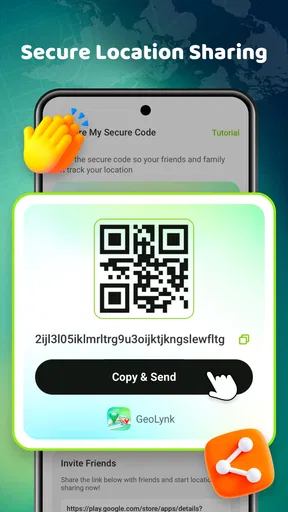
Location is personal information, so I’d make consent part of the setup rather than treating it as a small-print detail. The app’s positioning emphasizes secure sharing, but a reassuring phrase alone is not a privacy plan. Before relying on it, I’d look through the actual sharing controls, confirm who can see a location, and check how to pause or end sharing. Each person should be able to understand those choices and make them freely.
This is especially important when phones are shared, used by children, or managed by someone else. A location tool should support a clear agreement, not become a way to monitor another adult without their knowledge. If a person cannot freely opt in or out, I would choose a different approach. And if what you need is help in an urgent situation, use an appropriate emergency channel rather than assuming that a location-sharing app will alert someone or provide rescue support.
Questions I’d settle before relying on it
Will it work for a group whose members use different platforms? The app is presented as available for Android and iOS, which is useful for mixed-device households, but I’d still have each person check that the version and setup available to them meet the group’s needs. The minimum OS is Android 7.0, so a much older Android phone may not be suitable. Compatibility is worth checking before asking everyone to depend on a shared arrangement.
Does it need to be running all the time, and how much battery or mobile data will it use on your route? Those are practical questions for any location-sharing tool, especially on a long day away from a charger. I’d test it during a normal outing first, then check the phone’s own battery and data indicators rather than making assumptions. If someone has a strict data limit or an aging battery, frequent background location use may be a poor fit regardless of the app.
How accurate will the position be in the places you care about? No phone-based location should be treated as a perfect live view in every situation. Buildings, a weak connection, device settings, and the phone being switched off can all affect what another person sees. I’d use the map as a helpful indication for meeting up, not as proof that someone is exactly at a doorway or as a substitute for a message when timing matters.
Easy Location Sharing at Your Fingertips
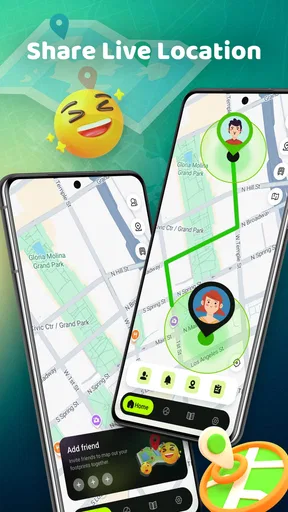
When I first downloaded Phone Tracker – Location Share, I was blown away by its simplicity. The app is incredibly intuitive. Setting it up took me less than five minutes, and once you’ve got it going, sharing your location is as easy as pie. Just a few taps and your real-time location is sent to the people you trust. For someone like me who’s always on the go, this feature is a lifesaver.
Real-Time Updates: Never Miss a Beat
What really sets this app apart is its real-time location tracking. Unlike other apps that can lag or glitch, Phone Tracker – Location Share offers seamless updates. Whether you’re meeting friends at a new spot or checking in with family during a road trip, you’ll find the real-time updates incredibly useful. The precision is impressive, and you can even see the battery life of the other person’s phone, which is a neat touch.
User-Friendly Interface
If you’re worried about technical jargon and complicated setups, fear not. The app’s interface is clean, straightforward, and user-friendly. Even if you’re not particularly tech-savvy, you’ll have no trouble navigating through its features. The design is sleek and modern, making it a pleasure to use. Plus, the app is available on both Android and iOS, so no one’s left out.
Privacy: Your Data, Your Rules
Of course, with any location-sharing app, privacy is a big concern. Rest assured, Phone Tracker – Location Share respects your privacy. You have full control over who sees your location and for how long. You can easily toggle the sharing feature on and off, and there’s no need to worry about your data being misused. It’s all about keeping you connected and secure.
Battery and Data Consumption
Another thing that’s often overlooked is how these apps affect your phone’s battery and data. Thankfully, this app is optimized to consume minimal resources. I’ve noticed only a slight dip in battery life, and the data usage is impressively low. This means you can keep the app running in the background without stressing about battery drains or data overages.
Why You Should Give It a Go
So, why should you download Phone Tracker – Location Share? Simply put, it’s an incredibly convenient and reliable way to stay connected with those you care about. Whether you’re a parent wanting to keep an eye on your kids or someone who loves staying in the loop with friends, this app is a must-have.
In a world where we’re all constantly on the move, having a tool that keeps you linked with your loved ones is invaluable. It’s safe, efficient, and easy to use. Give it a try, and you might just wonder how you ever managed without it.
Download links are available on the app’s official site, so why not check it out today? It’s time to embrace the convenience and peace of mind that comes with Phone Tracker – Location Share.
Where I’d use it—and where I wouldn’t
For a short, practical check-in, the appeal is easy to see. Imagine friends arriving at a busy station from different directions. Rather than sending a string of messages while walking, they can use the shared map to coordinate a meeting point. I’d still send a quick text if someone is delayed or needs to change plans; a moving dot cannot explain why a person has stopped or whether they want help.
The same distinction applies to family routines. A caregiver might find it useful to check that someone has reached a familiar destination, while a person who values a firm boundary between work and private time may prefer to share their location only during a particular outing. Before starting, agree on a simple routine for ending the share. That prevents a one-time convenience from quietly becoming an open-ended expectation.
I would skip this kind of app if the group does not genuinely want location sharing, if someone needs turn-by-turn directions, or if the main concern is recovering a lost phone. Those are different jobs. A navigation app is better for route guidance; built-in device-finding tools are designed around locating your own missing device; and a phone call or message is better when you need context, reassurance, or an answer. Phone Tracker makes the most sense when the people involved want a shared location view for coordination.
Small habits that make location sharing more useful
One non-obvious improvement is to agree on a check-in fallback before anyone needs it. If the map appears stale, the phone is offline, or the location looks unexpected, decide whether the next step is a text or call instead of repeatedly refreshing the screen. This keeps a technical hiccup from turning into a misunderstanding and makes clear that the app is a convenience, not a guarantee of contact.
I’d also keep the sharing circle deliberately small. Adding everyone who might occasionally ask where you are can make the arrangement harder to understand and maintain. Start with the people involved in a regular use case, and review the list when that need changes. This is a practical privacy habit, not a claim about a special feature: fewer people to coordinate with means fewer chances of forgetting who can see your location.
For a first trial, use a familiar route and compare what the other person sees with your actual progress. Try it while heading to a routine appointment or meeting, not during a situation where someone is depending on it for safety. That gives both sides a chance to learn how the app behaves on their phones and to decide whether the updates are clear enough for their plans. If the result is confusing, stick to direct messages rather than forcing the workflow.
How it compares with familiar alternatives
Compared with sharing a map pin through a messaging app, a dedicated tracker is more suited to an ongoing view than a one-time “meet me here” location. A pin can be simpler when the destination is fixed and there is no reason to follow someone’s progress. Conversely, a shared live view can reduce repeated status messages during a journey, provided everyone has agreed to it and understands how to stop sharing afterward.
Compared with broader mapping services that combine directions, place searches, and location sharing, this app’s identity is more focused on the sharing task. That can make the purpose easier to explain to a relative who only wants to see where a family member is, but it does not replace a full map when the user needs transit choices, route planning, or information about nearby places. I’d choose based on the job, not assume one app should handle every location need.
There is also a social trade-off: a group may already use a familiar service, so asking everyone to install and learn another app can create friction. If the existing option gives each person clear control and works across the phones in the group, staying with it may be the better decision. A separate tracker earns its place only when its simpler, dedicated role makes coordination easier for the people who will actually use it.
What I would keep an eye on
Because the app’s release date and current version show a young product timeline, I’d pay attention to how it develops without treating future improvements as guaranteed. The useful things to watch are practical: whether the sharing controls remain easy to understand, whether the app continues to work well across the phones in your group, and whether updates explain changes that affect everyday use. Those are sensible expectations for any location tool, not claims about features already present.
My overall view is that Phone Tracker – Location Share is worth considering when a small, consenting group wants a straightforward way to coordinate using location. Its strongest case is not constant oversight but fewer unnecessary calls during ordinary plans. The trade-off is that trust, phone compatibility, and real-world signal conditions still matter. I’d test it casually, set clear boundaries, and keep a messaging or calling option ready; if those basics suit your household or friends, it can be a useful addition rather than another app running without a clear purpose.
Pros
- Real-time location updates are accurate.
- Easy-to-use interface for all ages.
- Battery-friendly
- minimal power usage.
- Secure data encryption ensures privacy.
- Supports cross-platform functionality.
Cons
- Requires internet connection to function.
- Limited features in free version.
- Location accuracy may vary indoors.
- User interface could be more modern.
- In-app ads can be intrusive.
FAQs for Phone Tracker – Location Share
How accurate is the location tracking feature in Phone Tracker – Location Share?
The accuracy of the location tracking in Phone Tracker – Location Share can vary depending on several factors, such as GPS signal strength, internet connectivity, and device settings. Generally, the app provides real-time tracking with a margin of error of a few meters in optimal conditions. Ensure that GPS is enabled and the app has all necessary permissions for best results.
Does Phone Tracker – Location Share consume a lot of battery?
Like most location-based apps, Phone Tracker – Location Share can lead to increased battery consumption, especially when running continuously in the background. To minimize battery drain, consider adjusting the frequency of location updates and ensuring that the app is only active when necessary. Additionally, keeping your device’s software updated can help optimize performance.
Is my data secure when using Phone Tracker – Location Share?
Yes, Phone Tracker – Location Share prioritizes user privacy and data security. The app uses encryption to protect your data during transmission and ensures that only authorized users can access location information. It's important to review the app's privacy policy and terms of service to understand how your data is handled and managed.
Can I share my location with multiple users simultaneously?
Yes, Phone Tracker – Location Share allows you to share your location with multiple users at the same time. You can create groups or share your location individually with trusted contacts. The app provides options to manage permissions and control who can view your location, enhancing both convenience and privacy.
What should I do if the app stops updating my location?
If the app stops updating your location, first check your device’s GPS and internet connectivity. Ensure that the app has the necessary permissions to access your location. Restarting the app or your device may also resolve the issue. If problems persist, consult the app’s support section for troubleshooting tips or contact customer support for assistance.


